

This feature is completely free for all users. No credits, no coins, no plan required. Every TrendzSpot AI account gets full access to the Calendar and manual post scheduling at no cost.
The only other place worth adding a note is right at the Create Post step:
Everything else in the page stays exactly the same from the tutorial video placeholder all the way through to the managing posts section.Step 1: Click "Create Post"
Step 1: Click "Create Post"
To manually schedule a new post, click the + Create Post button in the top right corner. This opens the full post creation panel with a live Preview Mode on the right so you can see exactly how your post will look before it goes live.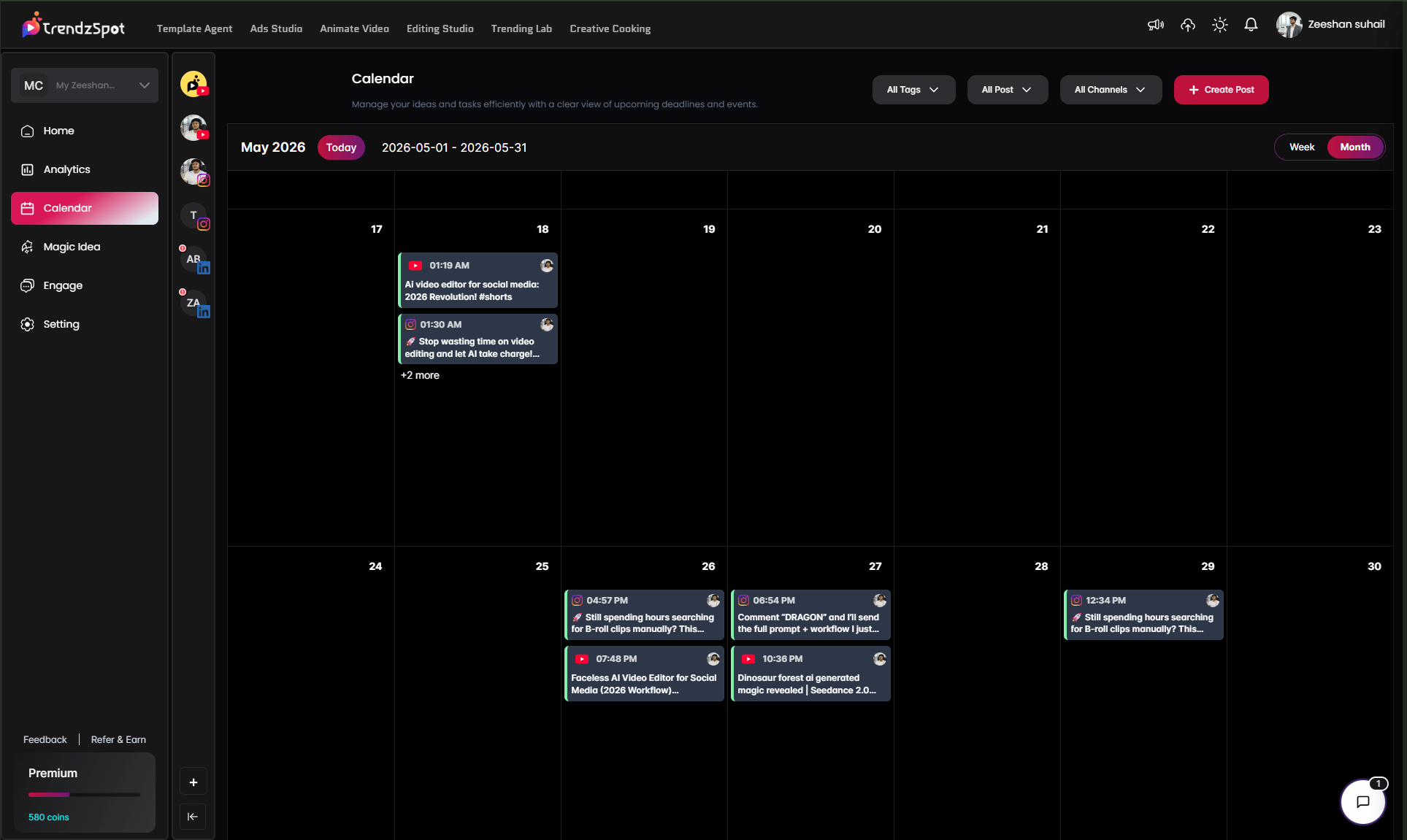
Step 2: Select Your Account
Step 2: Select Your Account
On the left side of the panel, you’ll see all your connected social media accounts with a toggle next to each one: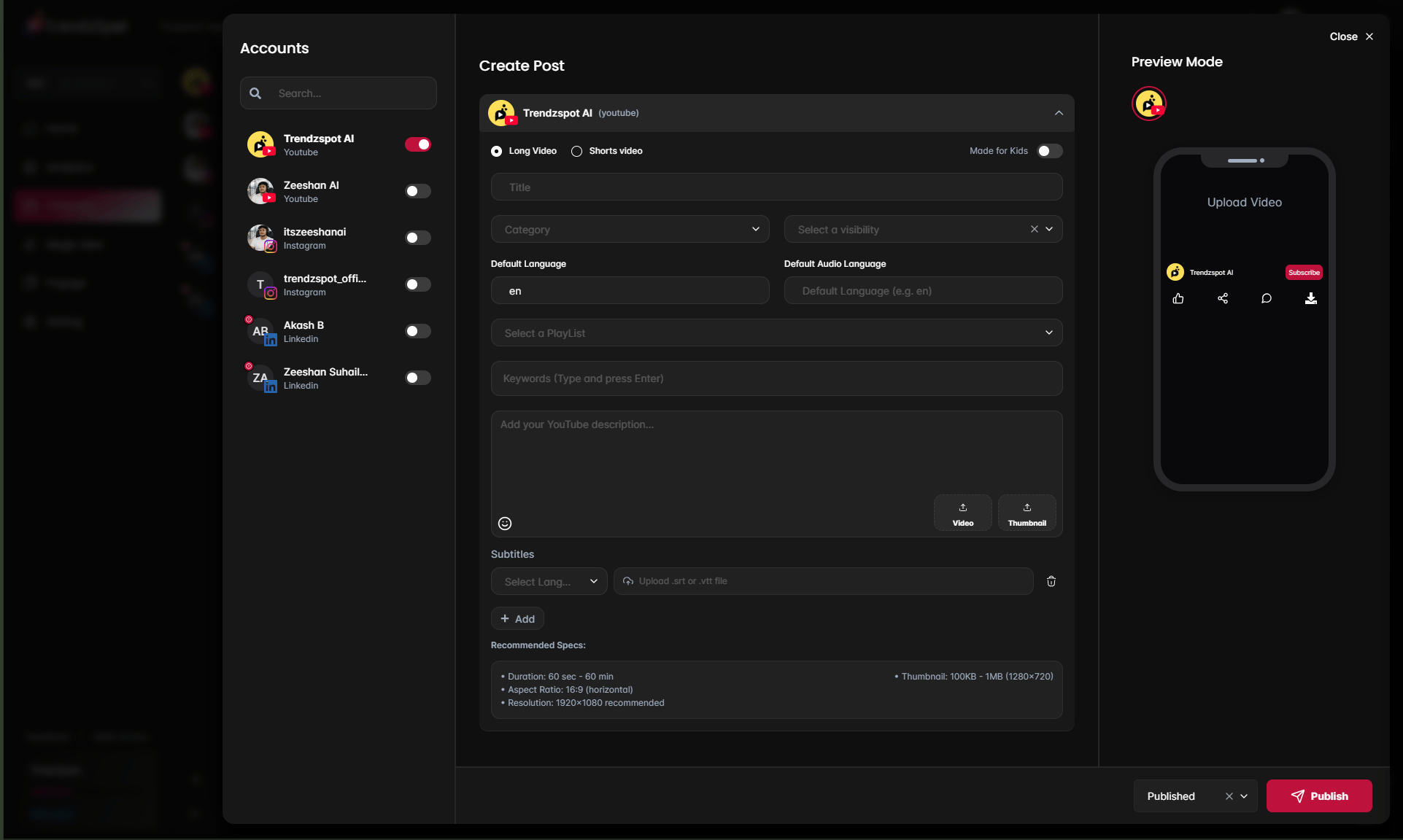
- Trendzspot AI — YouTube
- Zeeshan AI — YouTube
- itszeeshanai — Instagram
- trendzspot_offi… — Instagram
- Akash B — LinkedIn
- Zeeshan Suhail… — LinkedIn
Step 3: Fill In Your Post Details
Step 3: Fill In Your Post Details
The center panel shows the post creation form, tailored to the platform of your selected account. For YouTube it includes:Video Type:
- Long Video — standard YouTube video
- Shorts Video — vertical short-form content
- Made for Kids toggle — enable if your content is directed at children
- Title — enter your video title
- Category — select the most relevant YouTube category for your content
- Visibility — choose Public, Private, or Unlisted
- Default Language — set the primary spoken language of your video
- Default Audio Language — set the audio language separately if different
- Playlist — assign the video to an existing playlist on your channel
- Keywords — type your tags and press Enter after each one
- Description — write your full YouTube description with links, timestamps, and CTAs
- Video — upload your video file directly
- Thumbnail — upload your custom thumbnail (recommended: 1280×720, 100KB–1MB)
- Select a language and upload your .srt or .vtt subtitle file for automatic caption embedding
- Duration: 60 seconds – 60 minutes
- Aspect Ratio: 16:9 horizontal
- Resolution: 1920×1080 recommended
- Thumbnail: 100KB–1MB at 1280×720
Pro tip: Don’t just use the first idea AI suggests. Scroll through all 10 — the strongest video ideas are often further down the list where the angles are more specific and less competitive.
Step 4: Preview Your Post
Step 4: Preview Your Post
The Preview Mode panel on the right shows a live mock-up of how your post will appear on the platform — exactly as your audience will see it. For YouTube it shows the video player, channel name, subscribe button, and engagement icons.Review the preview carefully before publishing. Check that your thumbnail looks sharp, your title is clear, and the overall presentation matches your brand.
Step 5: Set Status and Publish
Step 5: Set Status and Publish
At the bottom right of the panel, set your publish status:
- Published — post goes live immediately on the selected platforms
- Scheduled — choose a specific date and time for the post to go live automatically
- Draft — save the post without publishing to finish it later
Pro tip: Build your calendar at least one week ahead. A full week of scheduled posts visible on your calendar means you never scramble for content last minute — and consistency is the single biggest driver of channel growth.
Connect your social accounts
Link YouTube, TikTok, and Instagram to enable direct publishing without leaving the platform.
Publish across multiple platforms
Distribute a single piece of content to all your channels simultaneously from your AI Board.
Automate with Template Agents
Build reusable AI workflows so your content pipeline runs on autopilot. Set it up once, repeat it forever.
Track performance with AI analytics
Monitor views, watch time, subscriber growth, and revenue trends in one unified dashboard.
The bottom line: Most creators waste 80% of their time on tasks that AI can handle in minutes. TrendzSpot AI Core Tools exist to give you that time back—so you can focus on ideas, not execution.